
AI-generated photographs often have a familiar look: overly smooth skin, similarly polished faces and expressions, and colors and textures that seem to turn up everywhere. Even when the fingers and anatomy are correct, the photograph can still have that unmistakable AI look.
That’s the look I want to get away from in my work. I want more than correct anatomy: the photograph should fit the brand’s style, and the people and scene should feel natural.
But “make it look natural” doesn’t tell AI what I have in mind. So I collect references before I write the prompt.
Collect Photos Before Writing the Prompt
Everyone has a different idea of what makes a photograph look natural. It might be soft light, an unposed expression, or muted colors. Putting a few photos together helps pin down what I’m looking for.
I look at the light, color, and texture of skin and clothing in photos I like, then collect others with a similar feel. Showing those images with my request gets me closer to what I want than trying to put every detail into words.
Midjourney makes this useful beyond the reference stage. I can upload the images to a moodboard and apply its style using the --p parameter with the board’s ID or code. That lets me carry the same look into different scenes. I keep the moodboard and change the scene, rather than explain the colors and mood all over again.
When a result isn’t right, I put it next to the references and compare the color, light, and expression. Maybe the colors are too vivid or the person looks too posed. I can point to what needs changing instead of just asking for “less of an AI look.”

Even If It Looks Good, Check the Hands
Midjourney is good at creating appealing colors and atmosphere, but hands, bodies, and objects often come out distorted. Even when I find a photo I like, I zoom in and check the details.
For photos centered on a person, I usually ask for shallow depth of field, as if shot at a low f-number. It helps cut down on inaccurate details in an unnecessarily busy background and keeps attention on the person. Their hands and body are still in focus, though, so those need a closer look.
At this point, I’d be making a variation or generating a new image in Midjourney, rather than fixing just the details in the photo I’ve chosen. So I take that photo into GPT and ask it to make the corrections while keeping the face, lighting, color, and composition.
In GPT, I can upload the original and explain what to keep and what to change. OpenAI’s image-generation documentation describes editing features for preserving details from an input image. I use these to fix awkward hands or objects without losing the overall look.
For example: “Keep the face, lighting, color, and composition. Fix only the fingers and the way the right hand connects to the wrist so they look natural.” I name what needs fixing and what I want to keep.
After the edit, I check the hand, then look at the whole photo. OpenAI’s official guide notes that edits can affect areas outside the selection. If the hand looks better but the face has changed or the surrounding texture looks odd, the photo still isn’t ready. I put it beside the original to check that the correction worked and the details I wanted to keep are still there.

Turning a Person into a Reusable Character Asset
Some projects call for more than one photo. When the same person appears in a different place or does something else, I need to keep the face and appearance I liked in the first image.
I treat the style of the photo and the person’s appearance separately. First, I choose a Midjourney image with colors and atmosphere I like. Then I use the person in it as a reference for the next images.
I use GPT or Higgsfield to make a turnaround: reference images of the person from the front, side, and other angles. GPT has been particularly useful for making these from the person in the photo I’ve chosen.
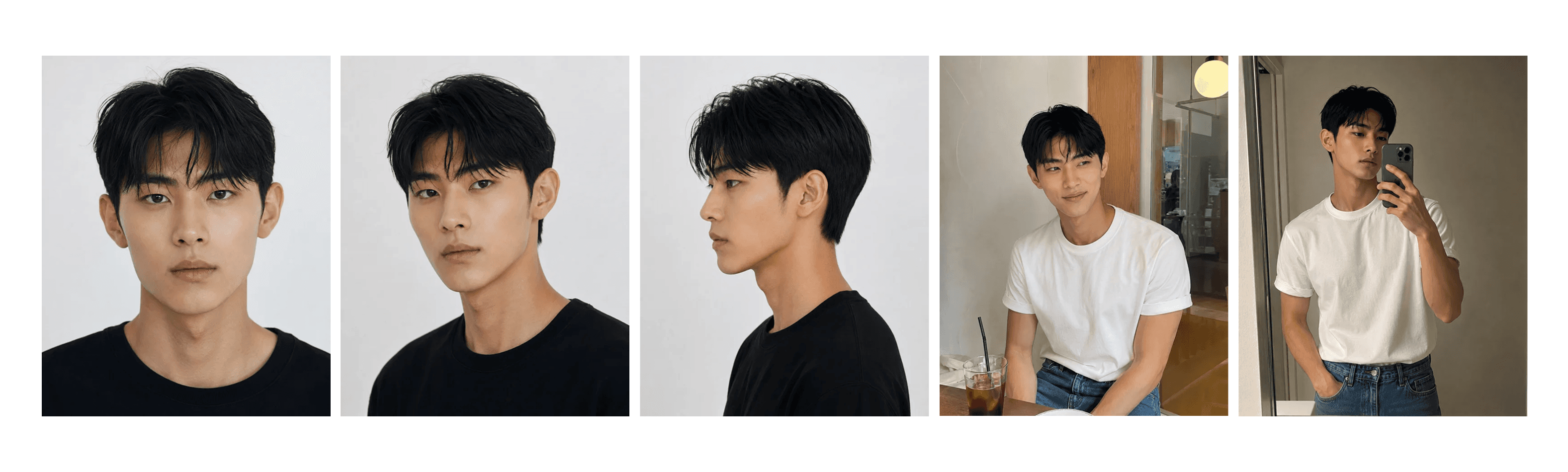
Here’s the usual sequence.
Choose a Midjourney photograph with an overall look and a person I like.
Use it to create a turnaround showing the person from several angles.
Supply the original photograph and character references, then request a new action or scene while preserving the color and style.
The request is simple: keep the color and mood of the reference photo and show the same person doing something else. Then I check whether it still looks like the same person and whether the photo has kept the same feel.
The turnaround is generated too, so I check that the person looks the same from every angle. Any side or back view missing from the first photo has to be generated. Once I’ve checked the references, I use them for the next scenes. They don’t guarantee perfect consistency, but they help keep the person’s appearance from changing with every image.
When More Editing Makes It Worse
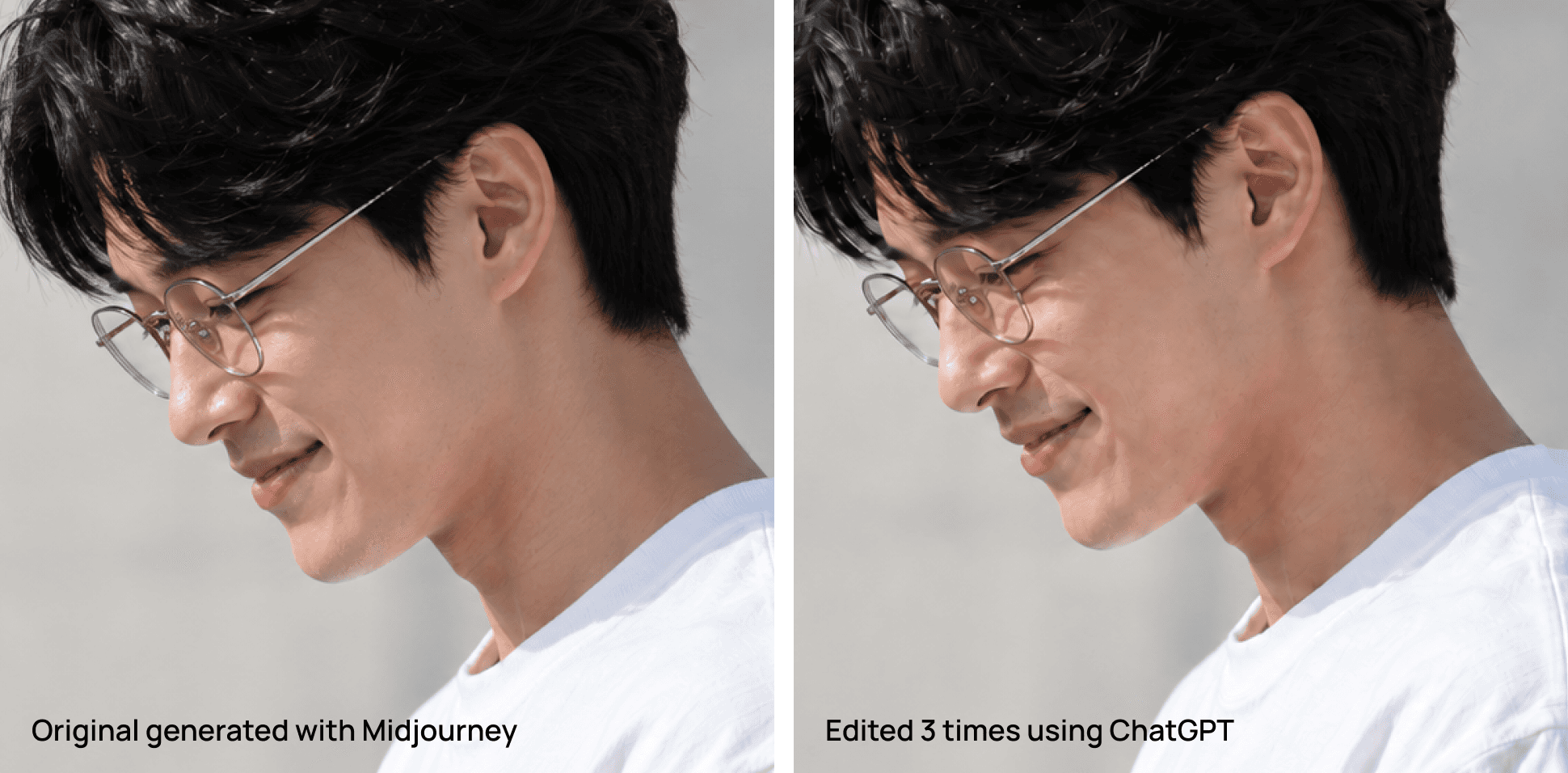
After several rounds of editing with GPT, areas that were clean can start to look blotchy. The part I wanted to fix gets better, but the photo loses its original texture, or something elsewhere starts to look off.
When that happens, I stop editing in the same conversation and go back to an image that still looks good. I upload it to a new chat and request the change again, or clean up the problem area with Photoshop’s Generative Fill.
A new chat doesn’t restore the image quality. It lets me start the edit again from a version that still looks good. It doesn’t always work, but having that version to return to is easier than continuing to edit an image whose texture has already broken down.
After editing one area, I look at the whole photo again. The correction needs to look natural and fit the light, color, and texture around it.
Let Go of the Perfect Prompt
I spend less time writing prompts these days. AI is getting better at understanding what I mean in context. I’ve also built a prompt generator to automate a lot of the repeated setup, which probably helps.
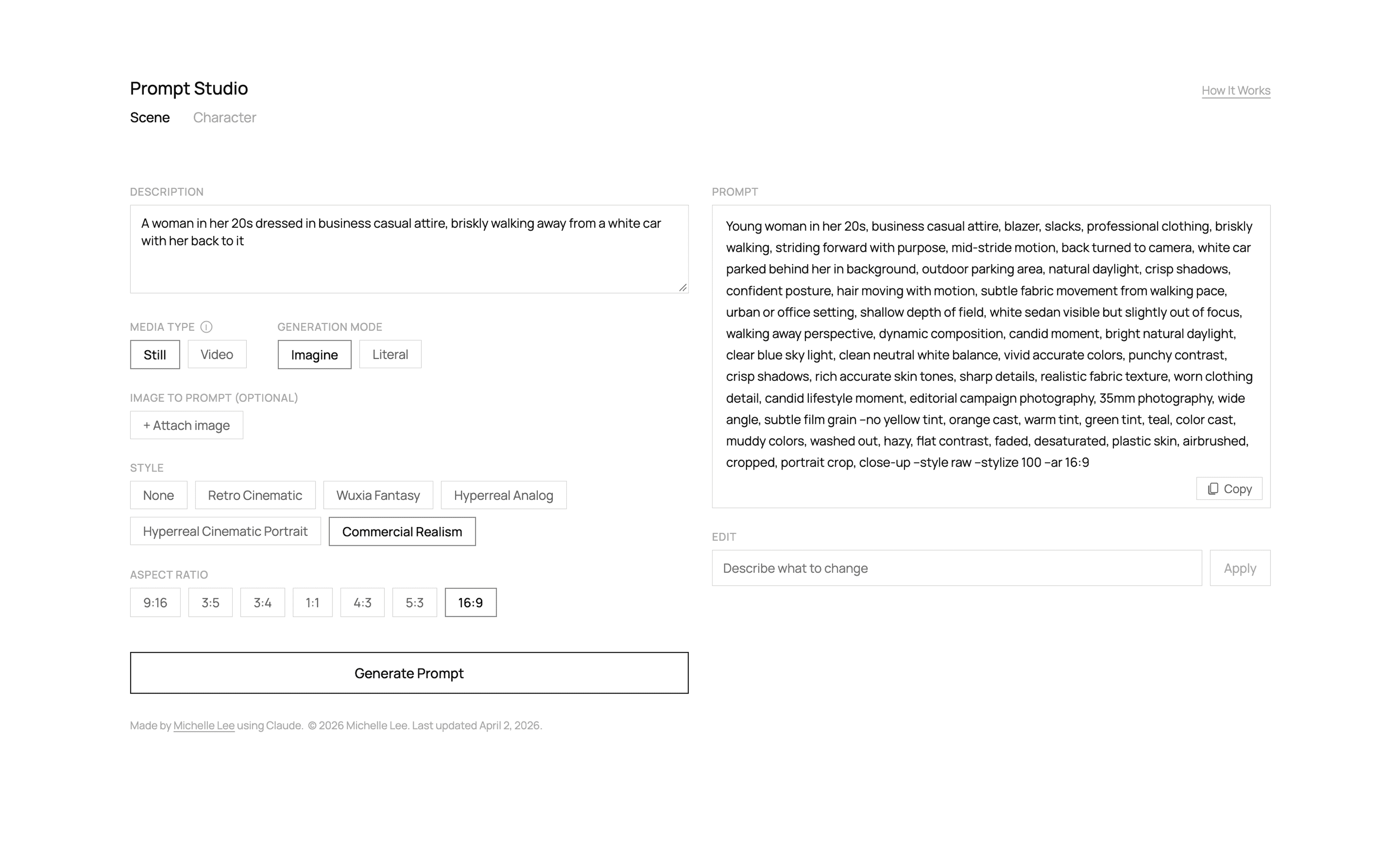
I usually jot down a rough description of the scene in my head and ask AI to turn it into a prompt for Midjourney or GPT. Sometimes I use it as written. Other times, I take only the parts I want.
Instead of perfecting the prompt, I spend that time deciding what I like about the photo, what needs to stay, and what can change. Then I ask AI to put my thoughts into words.
Prompts still matter. I just wouldn’t want anyone to think that one special sentence is the secret to a good photo. More of my work goes into choosing references, looking at the results, and deciding what to fix.
With AI tools continuing to improve, I get further by collecting photos that show what I want and making as many images as I can, rather than getting stuck searching for one perfect prompt. Looking at the results and adjusting the request gets me closer to the photo I’m after.